Stage 5 · Loop
Stage 5 hands your backlog to an autonomous coding loop.
The loop implements each item in a fresh context, runs your verification
command, and commits per item. The default runner is rauf; the runner is
configured, not hardcoded (see the loopRunner config).
What it does
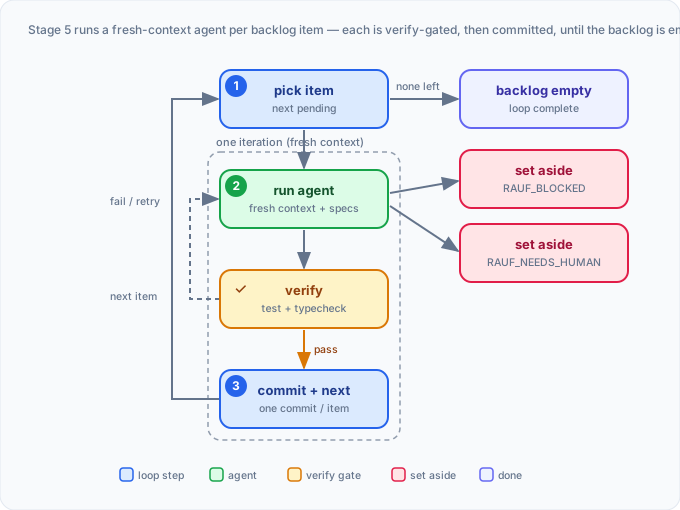
Section titled “What it does”The loop picks the next pending backlog item, spawns a coding agent with that item as its entire brief, runs the project’s test/type-check command, and — on success — commits the item and advances. Because each item runs in a fresh context (no memory of prior items), backlog items must be self-contained. See fresh context per item.
Command
Section titled “Command”/feature-forge:forge-5-loop <feature-name>(/feature-forge:forge-5-rauf-loop is an equivalent alias.) Before launching,
Feature Forge previews the run, checks prerequisites, and — if your runner supports
agent selection — lets you choose the coding agent. The loop runs in the
background and is supervised live; you don’t need to babysit it.
Inputs it consumes
Section titled “Inputs it consumes”- A complete
backlog.json(from Stage 4). - The
loopRunnerconfig fromforge.config.json(defaults to rauf). - The project’s verification command (
testCommand/typeCheckCommand).
Artifacts it produces
Section titled “Artifacts it produces”- Implemented source code, committed per backlog item by the runner.
- Loop state and logs under the runner’s state dir (rauf:
.rauf/, withstate.json,events.ndjson, andrauf.log). - An updated
.pipeline-state.json(Stage 5 marked complete when all items are done).
What you review & approve
Section titled “What you review & approve”- The run preview (command, backlog summary) and any agent selection.
- The live progress as items complete.
- Whatever the loop flags as blocked or needing a human (see signals below).
What comes next
Section titled “What comes next”- Run the Verify & Fix gate on the implementation — recommended before generating docs. With
autoVerifyenabled forforge-5-loop, this impl-verify runs automatically once the loop completes. - Generate documentation with Stage 6.
When the loop finishes, forge prints the next command in a copyable code block, so it’s a single tap to copy on mobile or a remote host.
Session management & monitoring
Section titled “Session management & monitoring”The loop runs in the background and survives the session that launched it. Each
backlog item gets its own fresh agent session (no memory of prior items), which is
why items must be self-contained. State for each feature is isolated under the runner’s
state dir — {backlogDir}/{loopRunner.stateDir} (rauf default .rauf/) — so concurrent
features never collide.
While the loop runs, Feature Forge supervises it live by reading rauf’s native
events.ndjson event stream (it does not redirect the loop’s output). As items finish,
item_completed events tally progress; item_blocked and loop_error are surfaced
immediately. When an item emits needs_human, the session pushes you a notification and
collects your answer for a post-run retry — the loop does not pause, it keeps working
the rest of the backlog. You don’t need to babysit a terminal, though you still can with
the rauf commands below.
A stall warning (llm_stuck_warning) names what was running when your runner
reports it: a warning with no tool in flight means the model itself went silent, while
one that names a tool (e.g. “Bash running 31m”) means a quiet tool call, usually a slow
verification gate, outlived the tool ceiling. rauf’s thresholds live in .rauf.json:
options.stuckThresholdMs (silence before the warning, default 5 min) and
options.toolStuckThresholdMs (how long a quiet tool call holds it off, default 30 min).
Raise the second one if your gates legitimately run longer. Usage-limit waits are not
stalls.
A run is only complete when every item is done, no review is pending, and the
runner finished cleanly (a crash, a stop or a usage halt is never complete). If the
--review pass fails or is interrupted, rauf reports reviewPending and the loop offers
rauf resume, which re-runs exactly that review. If you stop there, the stage closes as
unfinished and the next /feature-forge:forge-5-loop run offers the resume again. An
empty or unreadable backlog is never reported as complete.
See Sessions & monitoring for how loop sessions fit alongside pipeline state and the navigator’s context checks.
Branch reconciliation
Section titled “Branch reconciliation”The loop records which branch a feature’s work lives on, but treats that record as a
self-healing hint, not gospel. This matters on hosted surfaces (Claude.ai remote,
cloud agents) that impose an arbitrary session branch (e.g. claude/<slug>): that imposed
name can get recorded, and if you later move the work to your intended topic branch, the
stale record would otherwise make the loop offer to switch you back. Before launching,
the loop’s pre-flight reconciles against where your pipeline state actually resolves:
- Adopt the current branch — you’re on a non-default topic branch where the state resolves and the recorded name differs. The loop updates the record to match your current branch, with a visible one-line note. It never pushes you back to the stale name.
- Warn on drift — you’re on the default branch while the state records a topic branch. The loop recommends creating/switching to the topic branch, but still lets you proceed on the default branch.
- Nothing to do — the record already matches; the loop proceeds.
The current classification is also captured by the doctor diagnostic’s
branch-state check —
python3 <plugin-root>/scripts/forge-session.py doctor --json — if you want to inspect it
outside a run, with a suggested state-branch (adopt the current branch) or git switch
(go to the recorded branch) remedy attached. The legacy per-feature branchReconcile field
this classification always came from is unchanged and still emitted alongside it.
Watching and controlling the loop (rauf)
Section titled “Watching and controlling the loop (rauf)”You can observe and steer the rauf loop directly from a terminal:
rauf status <path> # one-shot snapshot: state, current item, countsrauf status <path> --follow # live-refreshing statusrauf follow <path> # rich live event viewrauf log <path> --follow # tail the human-readable lograuf loop stop <path> # stop a running looprauf resume <path> # continue where it left offThe signals
Section titled “The signals”Each item’s agent reports one of three outcomes:
RAUF_DONE— all acceptance criteria passed; the item is committed and the loop moves on.RAUF_BLOCKED— a missing dependency or unclear requirement; the item is set aside as blocked.RAUF_NEEDS_HUMAN— a decision, secret, or API key is required; the item is set aside and the loop keeps working other runnable items.
The runner does not pause for input. Blocked and needs-human items are surfaced
live (watch them with rauf follow/rauf status) and set aside while the rest of
the backlog runs to completion. To resolve a set-aside item, supply the missing
decision or secret and then re-run the loop — it picks up the items that were set
aside:
rauf resume <path> # continue the loop; retries set-aside itemsIf the answer changes the plan, stop the loop early (rauf loop stop <path>),
adjust the backlog, and re-run.
Notes & gotchas
Section titled “Notes & gotchas”- The backlog should be created (and ideally verified) first.
- rauf must be installed and meet the minimum version (
0.14.0), and set up in the project (rauf install .creates.rauf.json). See Install. - The runner refuses a dirty working tree; the stage commits pipeline state before launching.
- If you run a non-default agent but your items carry Claude model aliases, the loop
warns and offers to strip them. Agent precedence:
item.model> run--agent> projectdefaultAgent> runner default. See Cross-agent usage. - For epic members, an unmet dependency triggers a gate you must explicitly clear.
- rauf internals (full CLI, recovery, archives) live in the rauf repository.