Pipeline Overview
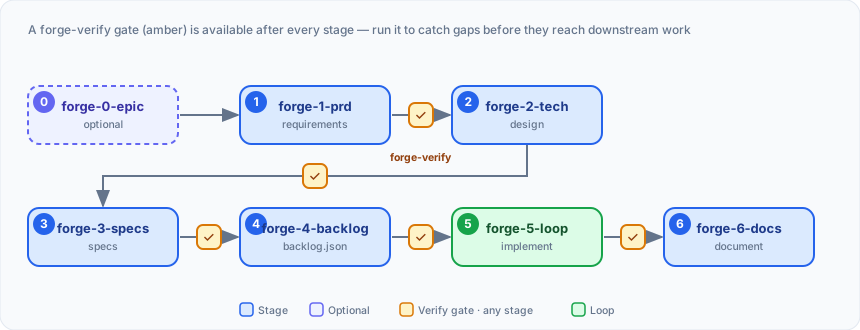
The Feature Forge pipeline is a fixed, resumable sequence of stages. You drive
each one with a slash command; each consumes the previous stage’s output and
produces the next. State lives in .pipeline-state.json, so you can stop and pick
up later.
Before the pipeline: setup
Section titled “Before the pipeline: setup”- Existing project → run
forge-initonce to createforge.config.json. - Empty repo → run
forge-bootstrapto scaffold a green baseline first. - Change too large for one feature → start with an optional epic (Stage 0) to break it into member features.
The six stages
Section titled “The six stages”| Stage | Command | What it does | Produces |
|---|---|---|---|
| 1 · PRD | forge-1-prd | Capture requirements (what) | PRD.md |
| 2 · Tech Spec | forge-2-tech | Technical design (how) | tech-spec.md |
| 3 · Specs | forge-3-specs | Build-ready detail | 00-…NN-*.md, TRACEABILITY.md |
| 4 · Backlog | forge-4-backlog | Queue of work items | backlog.json |
| 5 · Loop | forge-5-loop | Implement autonomously | committed code |
| 6 · Docs | forge-6-docs | Document the result | docs/architecture/<feature>/ |
Each stage runs as /feature-forge:<command> <feature-name>.
The verification gate
Section titled “The verification gate”After any stage you can run the Verify & Fix gate:
forge-verify analyzes the stage’s artifacts and writes a findings document;
forge-fix applies the fixes. It’s strongly recommended — especially before Stages
4 and 5 — and since it runs in a fresh, read-only subagent, the recommended way to
run it is to let it run automatically: set
autoVerify: true and each stage is verified
for you with no prompt. Fixing stays human-gated unless you also enable autoFix.
Resuming and re-running a stage
Section titled “Resuming and re-running a stage”The pipeline is resumable: state lives in .pipeline-state.json, so you can stop, clear
context, and come back later. If you re-run an authoring stage (Stages 1–4) you already
started, it detects the re-entry instead of blindly restarting the interview — it inventories
what’s already on disk and offers to resume where you left off (after an interrupted run)
or start a new version (when the stage was already complete). Pass --force to skip the
gate and restart from scratch.
Tracking progress
Section titled “Tracking progress”Run /feature-forge:forge <feature-name> anytime to see which
stage you’re at and what command comes next. New to the terms used here? See
Key Concepts & Glossary.